

How AI is Disrupting the Software Development Industry
Insights on effectively using AI in software development and architecture, along with some remarkable side effects.

To get you curious, here are three quick teasers before we dive in:
AI’s most disruptive factor in software development isn’t its ability to “reason” as a software developer. It’s something much simpler.
A technique like BDD can have a similar positive impact to that of AI agents.
Can the AI replace software developers and architects? That depends on two AI agents discussing an incident in a war room.
Intro: Vibe Coding
The landscape around AI is moving so fast that we haven’t agreed yet on a good name for the concept “Developing Software using AI”. It’s no surprise, considering that we still can’t define what the boundaries of software development or software architecture are.
Andrej Karpathy, a co-founder of OpenAI, coined the term Vibe Coding. As of the date of writing this article, Wikipedia defines it as follows:
Vibe coding (or vibecoding) (or vibecode) is an approach to producing software by using artificial intelligence (AI), where a person describes a problem in a few natural language sentences as a prompt to a large language model (LLM) tuned for coding. The LLM generates software based on the description, shifting the programmer's role from manual coding to guiding, testing, and refining the AI-generated source code.
From AI-Assisted to Vibe to Not Coding at All
Let’s look at the context of the Vibe Coding definition. This term emerged in early 2025, when many software developers were already utilizing tools like GitHub’s Copilot to leverage AI and reduce the amount of code they needed to type themselves. Most people used it as a very smart auto-complete feature, which suggests code blocks that developers can accept immediately by pressing the Tab key.
The coding flow changed from typing text to typing a bit of text, getting a ghost-like suggestion by the copilot trying to guess what you were intending to do, and then either accepting fully, accepting and adjusting the code because it was only partly accurate yet worth including because it saves you time, or rejecting and continuing (because it wasn’t worth inserting something that required too many adjustments).
Then, you could also use it to produce complete blocks of code given a prompt, which could also include code. These tools typically worked on the side of your development environment, and you copy-paste across them. Very useful to draft tests or create simple logic in popular programming languages.
As AI models evolved, some people began using them for a broader range of software development functions like debugging, writing test suites, or analyzing existing code. At the same time, GitHub’s Copilot and other similar tools evolved to become full coding agents that can integrate deeply with your IDE and do much more than suggest little to mid-size code blocks. These tools, such as Cursor, Cline, Junie, and others supported by AI models from Anthropic, OpenAI, or DeepSeek, can create projects from scratch, generate all necessary components for both the backend and frontend, test them, create deployment scripts, and assist in deploying them to the cloud. So, they can build an entire application for you just by providing them with high-level ideas like a mock design drawn on paper, right? Software developers are no longer needed, right?
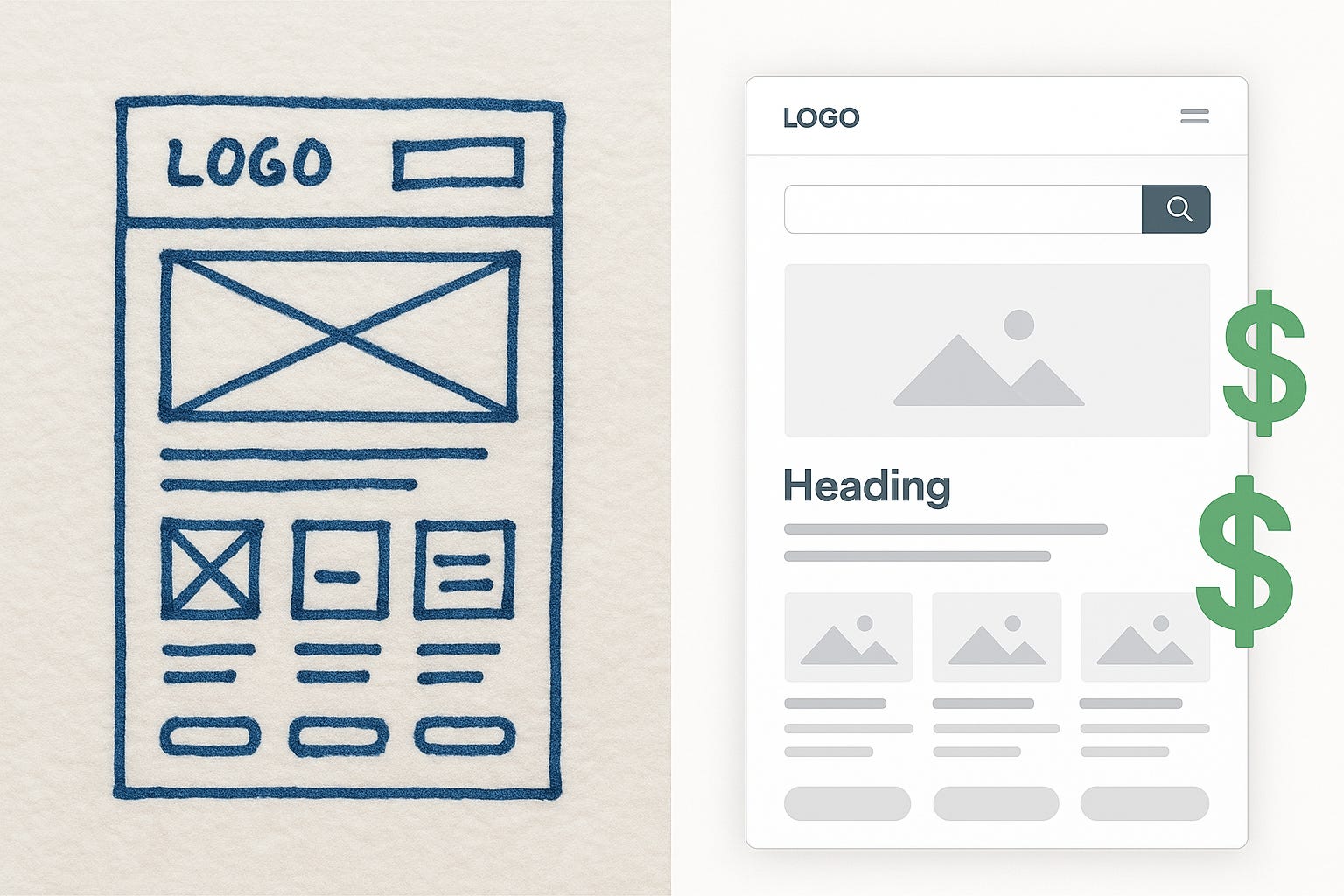
Not so fast. The author of the Wikipedia definition is exactly right when they choose the term “producing software.” The AI and you are producing software. The AI itself can also produce software. But can you run a business with that software in a sustainable way? Where are the limits of this software production, if any? Let’s look into that in detail.
Dissecting Software Design and Development
To understand these new paradigms of software production using AI, we need to establish clear definitions of what we mean by producing software. If we don’t clarify it fully before introducing AI, we’ll only create more confusion after that.
I’m using the same Delivery Function Maps as in a previous post, The Invisible Architect. The key idea is to illustrate all the functions required to map an abstract idea into a delivered software solution that you can use.

This time, I’m going to zoom in on the Software Architecture and Software Development functions, to have more fine-grained functions that are part of them. Functions do not necessarily map to roles, so you can have a different idea of what Architecture and Development encompass, and map these functions into differently-structured roles. That’s precisely the point of my previous article. In any case, this separation of functions is good enough for the goal of this exercise.
I’m also excluding all the other functions to the left of the spectrum (sales, product management, etc.).
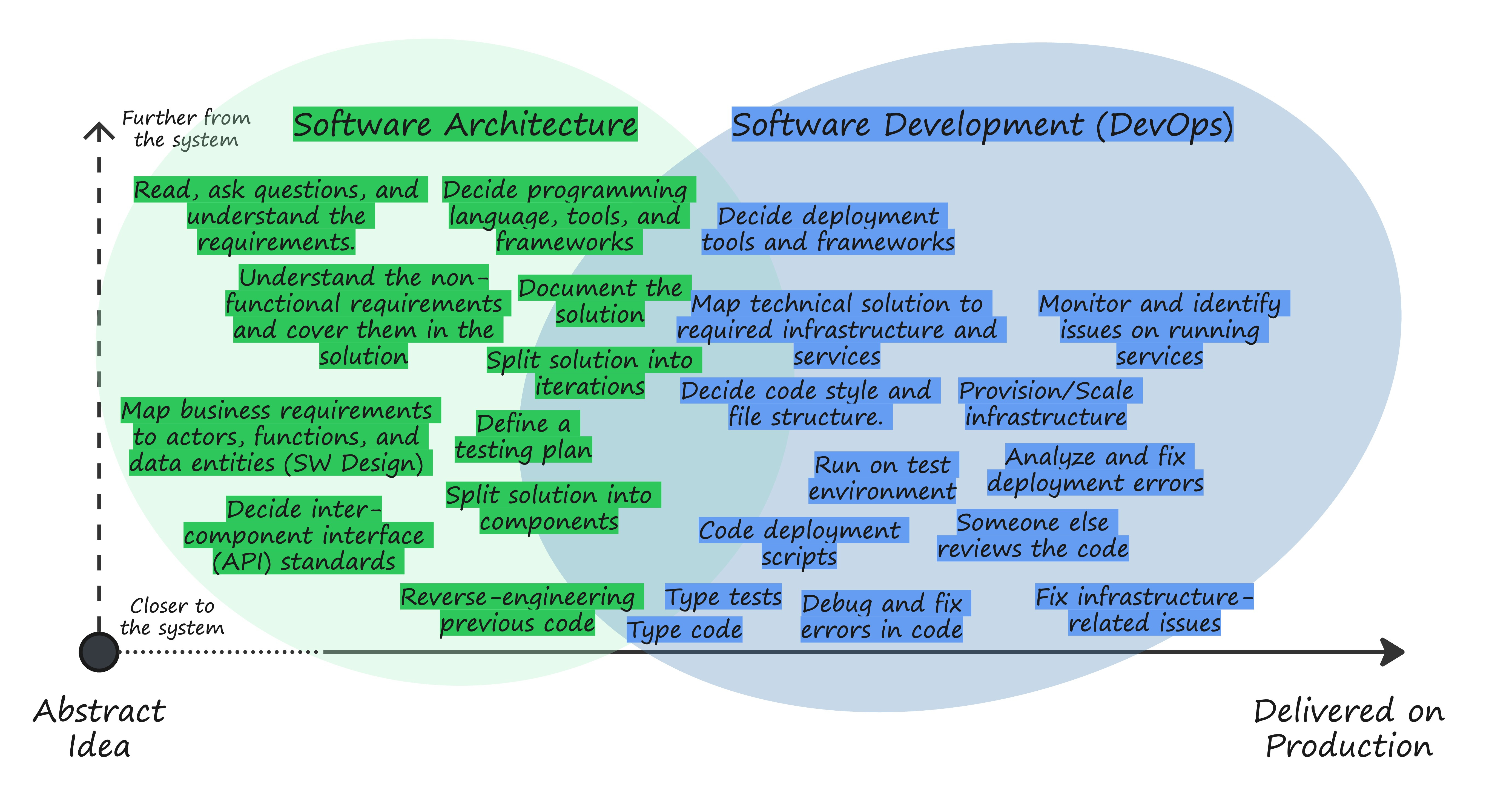
A common mistake made by people unfamiliar with software development is thinking that “Type code” is the primary function of a developer, and that it’s the one that consumes most of the time, neglecting all the other ones. Perhaps that was true several decades ago, when programmers had to write significantly more code and plan creative methods to translate functions into machine-readable instructions. Today, with all the modern frameworks and tools available to software developers, that belief no longer sticks.
Based on my experience, “Type code” and “Type tests” account for less than 10% of what a software developer does at work. The only exception is when you’re starting in that field, and you need more time to get familiar with the programming language and the paradigms. In any other case, if typing code and tests take you more than 10% of the time, it’s undoubtedly because you’re embedding some of the other functions within Typing, typically the green ones on the left side of the image above, floating around Software Design and Architecture. If you still disagree with this, I challenge you to set a timer to see how much of that time you’re hitting keys on your keyboard vs. just thinking and staring at the screen.
We all must settle on the fact that Typing Code is a minor task in software development. If you think that Typing code is the primary task, then undoubtedly you’ll fall into the trap that AI will replace all the developers the moment that you watch one of these AI agents coding automatically in the IDE.
Aside from the dramatism in the image, my perspective on AI is that it’s a truly disruptive technology that fundamentally changes how we develop software. And it’s a positive thing since Typing Code when you already know precisely what you need to type is inherently ineffective. It would be much better to communicate with computers in a language that is even closer to us than the ones humans have developed over the years, which increasingly abstract us from machine-readable code (from assembly to the latest programming frameworks). So why not Spanish, English, or your preferred conversational language? People have been claiming for a long time that that’s the next natural step. But would this level of abstraction be fully practical and include all the functions listed on the image above? Would it prevent us from needing to navigate through the code and understand exactly how it works?
It depends on how we incorporate AI into the software development process. Let’s get into that topic.
AI-Produced Software: Strategies
Now that we have dissected software architecture and development into their functions, let me differentiate different strategies for producing software with AI depending on how deep the integration goes and the skills required by the human interacting with the machine.
Strategy 1: Using AI as a Code Typing Assistant
I briefly mentioned the first approach to working with AI at the beginning of this article. In this one, developers mostly use copilot suggestions as they code to save some typing. This is how it looks:
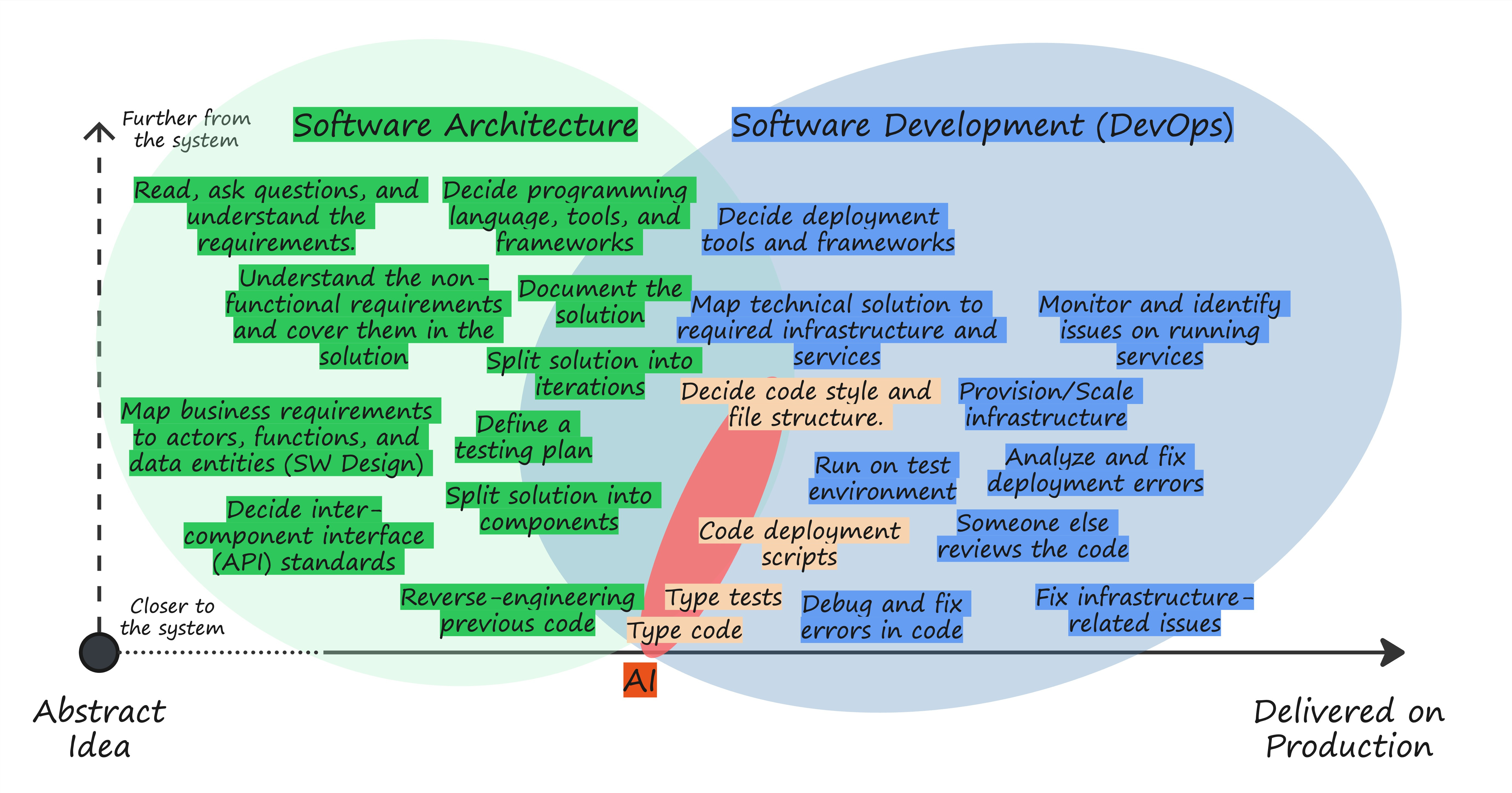
The human is still in control, as the machine mainly suggests small to mid-size code blocks. If you blindly follow the flow (and you start feeling the vibe), you’re already giving away some micro-decisions to AI, which will introduce different coding styles and ways of structuring code within that file as you would have chosen yourself. This doesn’t look like a problem when you've got that magic code block that just does the trick, so you keep pressing the Tab key and being delighted about the time you’re saving yourself and the organization.
You’re saving time on the Typing side of things, for sure. But you’re impacting other vital functions such as “Debug and Fix Errors”, “Reverse Engineering previous code”, “Someone else reviews the code”, “Document the solution”, and “Monitor and identify issues on running services”. When you or other people try to make sense of the code after a while, it’ll be more difficult than if the code looked consistently similar across the project.
Okay, I know what you are thinking. “This problem already exists. It’s exactly what happens now with multiple developers working on the same project. That’s why we invented coding guidelines, technology standards in the organization, etc.” You’re right. Let’s think of possible solutions. Between humans, we try to leverage code consistency’s advantage by setting code formatting automation in IDEs, guidelines for pull request reviews, README files, or ad-hoc documentation about coding principles. Can we instruct the AI code generator to follow those? Sure, we can, by specifying these constraints and instructions as context in your prompts. Moreover, we can leverage AI to review human-made code in pull requests and ensure that it also follows the guidelines.
Therefore, the potential disadvantage can be turned into an advantage as long as you use your AI tooling wisely, passing detailed instructions and constraints. You may have believed coding guidelines were unnecessary before adopting this AI strategy, thinking people would follow best practices automatically. Now, you see the value in documenting the guidelines explicitly (in a prompt format).
Can you already find out what’s happening here as a side effect? Let’s analyze it in a further section.
Strategy 2: Using AI Agents to build complete features
The next step in AI adoption for software development is to delegate a few more functions to it:
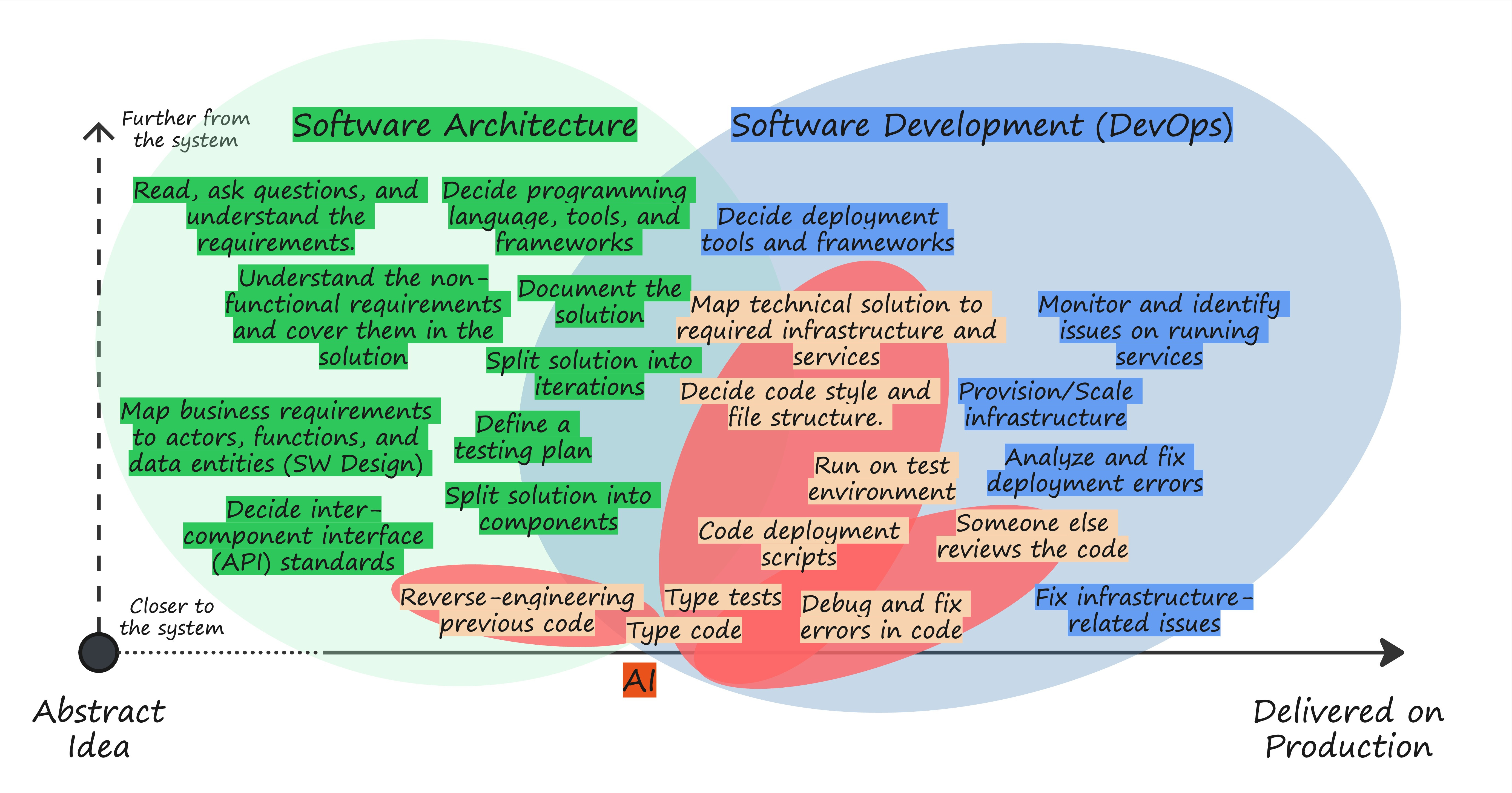
If you follow this approach, you utilize some of the existing AI agents integrated into development environments and let them write full components and features across multiple code files. These agents can also interact with your command-line interface, compile and run code, commit and merge files, and even open a browser or test environment to verify whether the solution works. Watching them for the first time as they create code, interact with the terminal, realize they've made a mistake, and fix it on the fly is equally fascinating and scary.
You can produce a lot of code following this approach, but that doesn’t mean it’s valuable code. However, if you’re good at defining a structure of patterns and guidelines in your prompts for coding, design, and architectural choices, you might generate some decent code that both you and your AI agent can maintain over time. It may not be as clean and structured as you could have created it, but it’s good enough.
So, you enter vibe coding. Remember the definition:
[…] shifting the programmer's role from manual coding to guiding, testing, and refining the AI-generated source code.
You start shifting how you spend time from typing code to having semi-technical/semi-functional conversations with an AI agent. You decorate these prompts with constraints and guidelines to ensure the produced software is maintainable, secure, readable, and has good performance, among other qualities. Often, you make adjustments to the produced code to fix errors or refactor parts that you consider can be improved. In any case, you can save a lot of time not only on typing but also on testing, debugging, reviewing, and modeling.
This works well for small to mid-sized technical components, where the context is manageable by current AI models. If that’s the case, this strategy can even work on existing code, allowing the agents to analyze it and make changes. In that situation, it helps if you provide some context in your prompts that enables the agent to understand the structure and functionalities that exist there. For bigger projects, you still need to leverage software architecture skills to split the system into domains, with clear boundaries and interfaces between them. Then, each domain or its components can be managed within the AI context.
Let’s sink what Vibe Coding entails for a moment. Previously, as developers, we would create a mental plan for modeling the solution, structuring data changes, and testing use cases, typically while our IDE was already open in front of us. That information remained in our minds as we typed and gave it a shape. Now, AI is forcing us to articulate our mental model beforehand, as a prompt, specifying what we want to accomplish, and making us reflect on whether it’s a solid plan or not, as we get feedback from the solution the AI produces.
We’ll see how this seemingly minor behavior change disrupts the entire software development industry later.
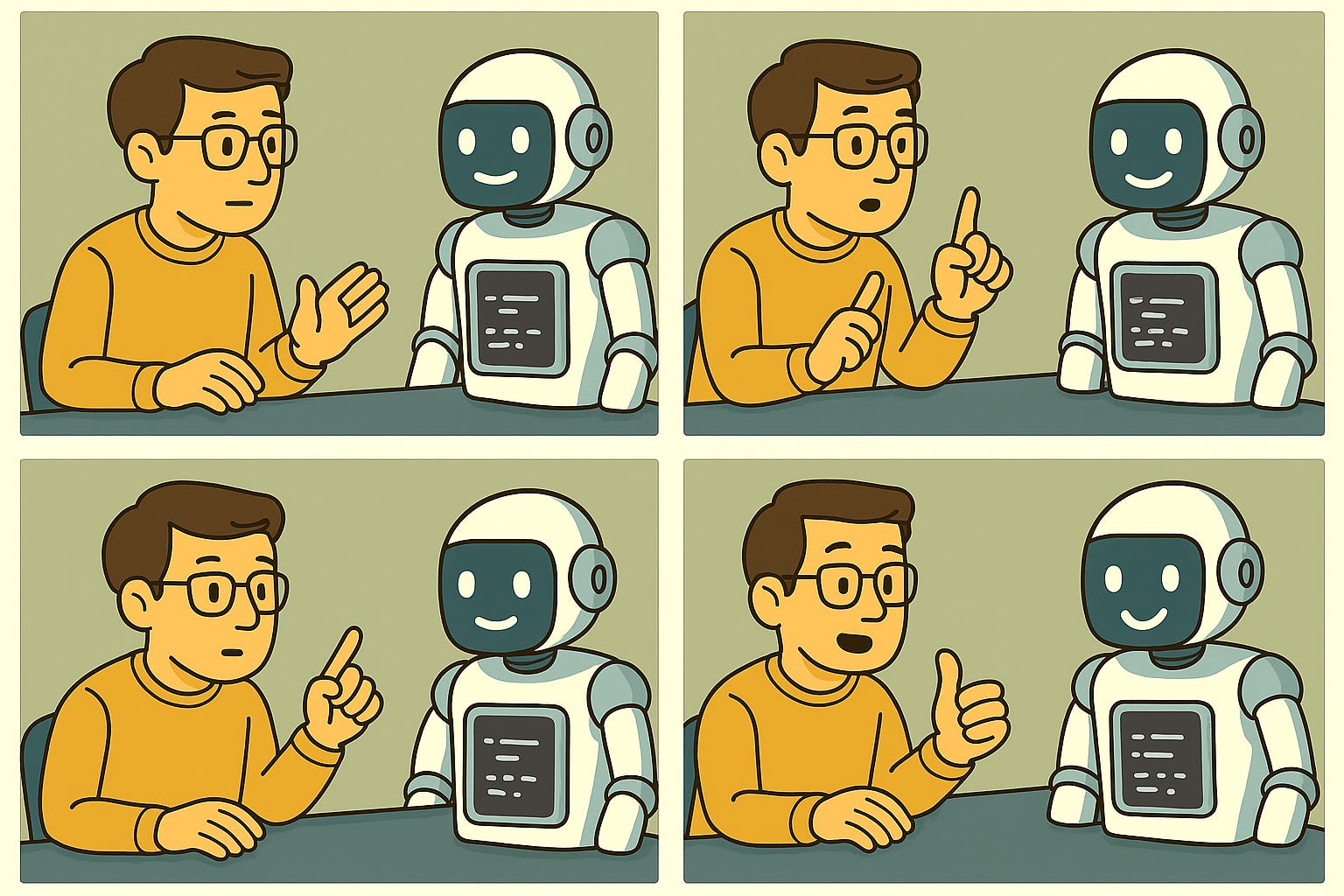
If you feel more like a modern version of the Cowboy/Cowgirl developer (vibe spaghetti coding?), surely you think that prompts don’t need to be that detailed, and you don’t need to think and design your prompts that much before passing control to the AI agent. That’s fine, as long as you accept that the risks are higher when you don’t get very strict about how you would like the code to be produced and structured. Now, the problem is not simply that the AI is using a for loop instead of a foreach one. The entire project structure or programming paradigms might change, including the use of different ones in combination. Since some of the functions are still under your control, like “Monitor and identify issues on running services”, “Cover non-functional requirements”, “Split solution into components”, and “Decide inter-component interfaces”, you can’t simply embrace ignorance of what the produced code does. You must understand it.
Again, having a component with mixed architectural styles and using different frameworks or programming paradigms is not a new problem. It’s what happens when you don’t have any software architecture principles or follow standard patterns and guidelines at all.
Who operates the AI in this Vibe Coding strategy?
The boundaries of functions covered by AI remain within the technical realm of software architecture and development, which means that technical professionals (developers, architects, and new role names) are the ones operating AI in this context.
One of the most significant impacts of this approach is that AI is redefining some classic organizational roles. A new function arises: “Guiding, Testing, and Refining the AI-generated source code,” and new roles with fancy names are created around that, e.g., AI (Prompt) Engineer. Additionally, software developers can start contributing more to software design and architecture, or shift to the right side of the spectrum, focusing more on operations.
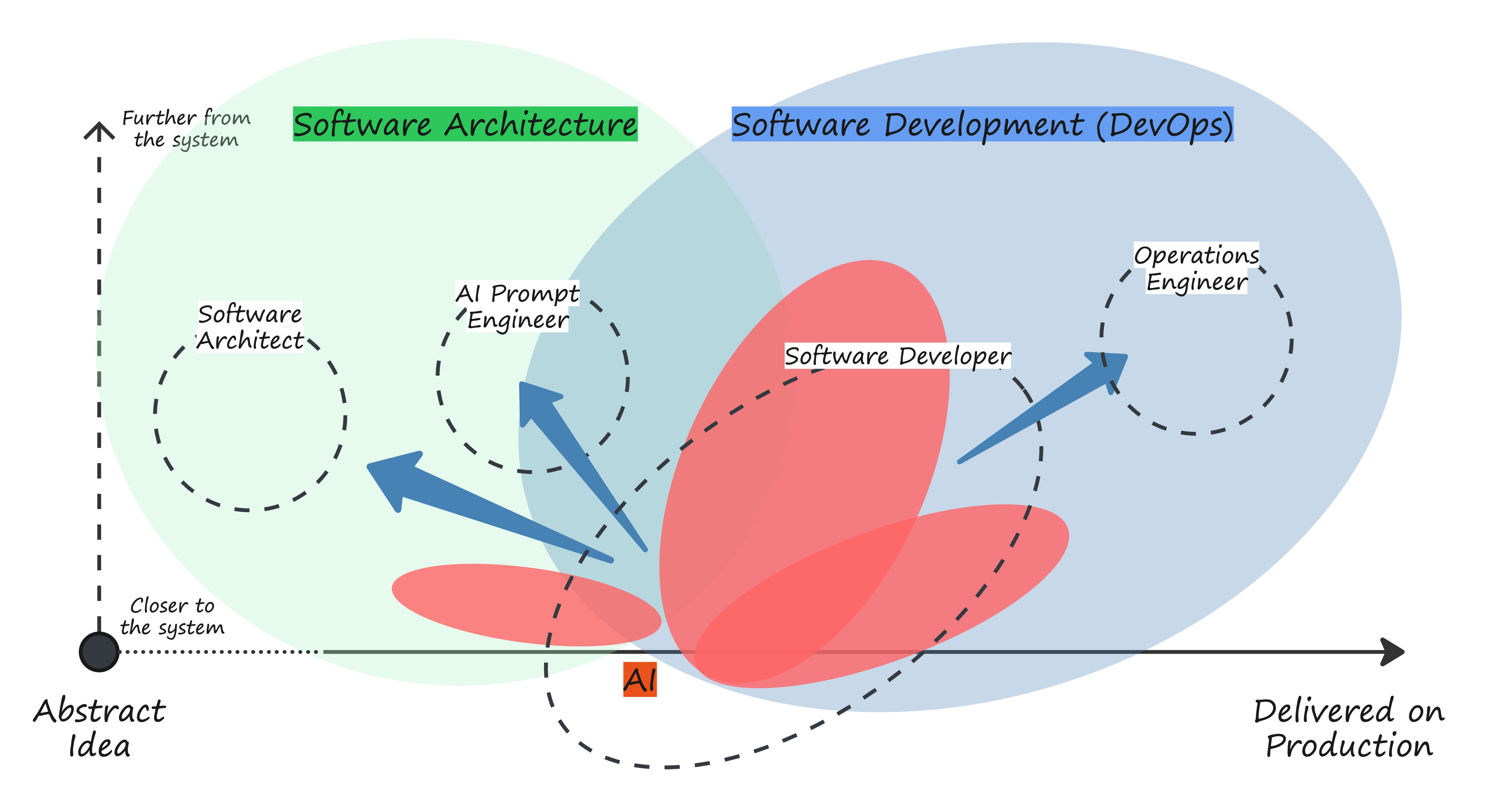
If you’re overexcited about AI or feel pessimistic about your job, you might be wondering whether it’s worth following those blue arrows at all. Those red ovals are growing. Social media posts paint this as an inescapable truth, don’t they? Wait, we’ll cover that later.
For now, let’s follow the hype and examine if we can push more functions onto AI.
Strategy 3: Using AI to build entire products
The most powerful promise of AI for software development is that you can build complete applications or systems without having software development knowledge.
As you can imagine, any strategy that provides an incomplete solution and sits between the previous strategy and this one is doomed to fail to deliver on its promise, since nobody with zero computer programming knowledge is going to be able to fix a bug in a real-life application if that involves looking at code and modifying it. Similarly, they won’t be able to scale the application if it consists of reviewing and adjusting deployment scripts.
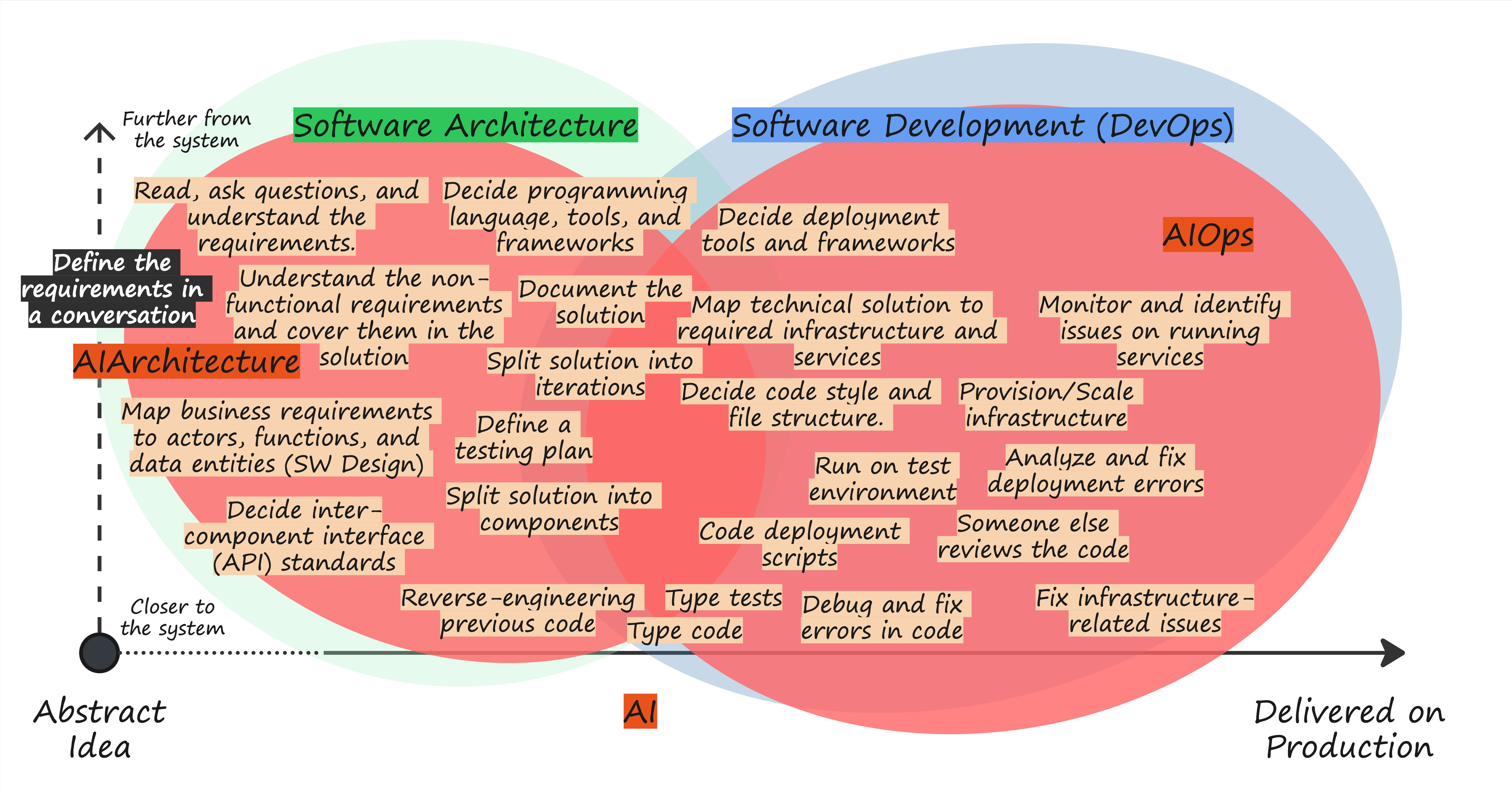
As you can see in the picture, all functions are supported by AI in this strategy. You only need to define the business and functional requirements in a conversation with the agent, ideally using your preferred language.
On the right side of the spectrum, there is the emerging field of AIOps, which involves AI agents that analyze applications at runtime and make decisions based on error patterns, security breaches, and other factors. AIOps can also enclose the cost aspect (FinOps) and create an infrastructure design that is similar in cost or even cheaper than what a real team would deliver.
At some point, to ensure they can cover the entire DevOps area and avoid any gaps, these agents and those producing code must have access to the same data, so the agent identifying the error, e.g., in the logs, can determine where the error lies in the code. Imagine how cool: war rooms in incident management where the only ones attending are your AI coder and your AI Ops bot, and they find the bug in code and release a new version while you’re enjoying a drink at the Costa del Sol.
Machines fixing machines. The AI-powered version of System Self-healing.
AI Lizard Tails.
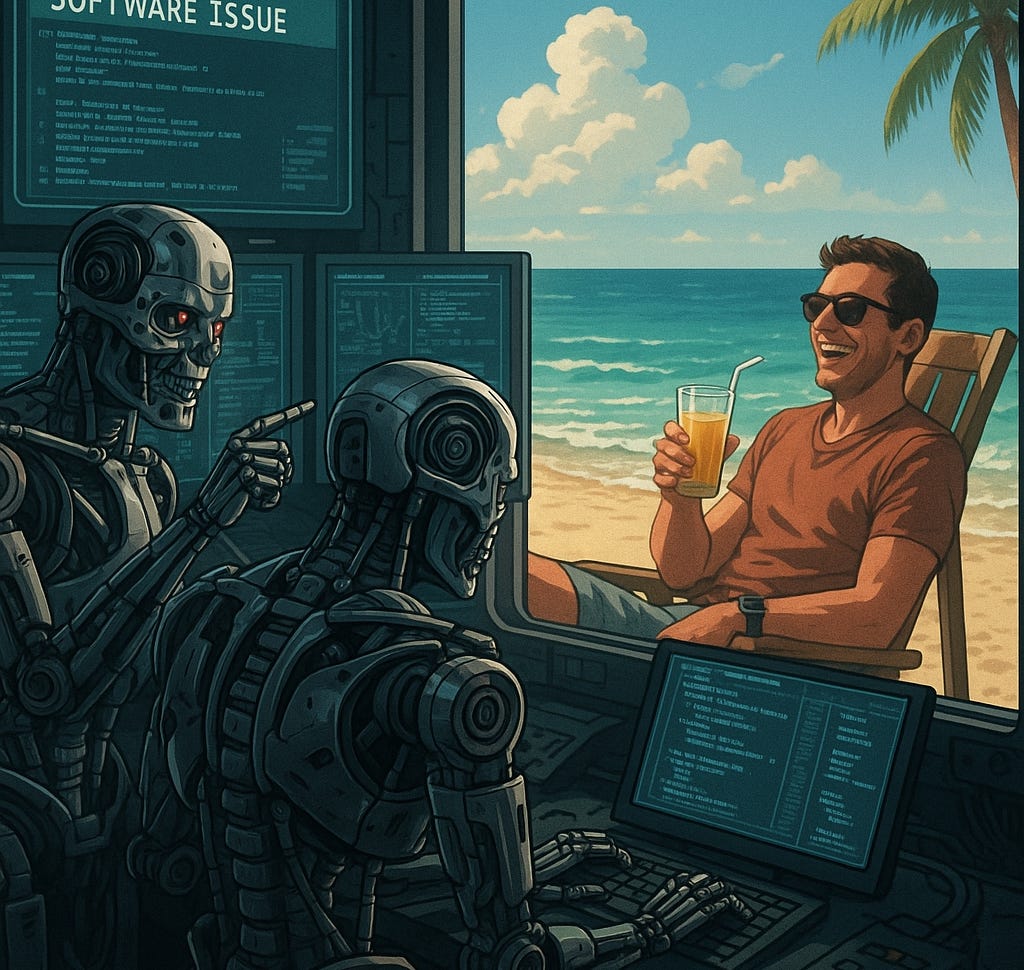
On the left side, the promise that AI can absorb software architecture. This becomes much simpler once AI can handle operations smoothly for the code it produces. Why would that make architecture simpler? Because nobody cares if the AI is creating spaghetti code, a horrible monolith, or two thousand microservices as long as they don’t need to modify or even see the code, and it’s not impacting costs. All functions that were required due to human-related constraints are gone. Splitting into components to reduce cognitive load? Scratch that if the AI can model the whole domain at once. Document the solution? I’m fine with a black box. API modeling? I can disregard internal ones and focus on those that interface with external systems.
Okay, let’s stop dreaming.
You might be as scared as I am at the moment, picturing myself enjoying a drink while two machines speak some gibberish (why English?) in a virtual war room, trying to figure out and fix a problem in a critical system (think of healthcare, military, or nuclear power plants). Maybe it’s too early for me to trust those machines. Or perhaps I don’t want to trust the people who instructed those AI machines on how to operate in the event of an incident (unless these instructions are fully transparent to everyone).
At the time I’m writing this article, we still need humans to operate and fix robots, both in their hardware and software versions. If we need humans to fix software, we need humans to understand how this software was assembled. At least its primary structure, in the shape of components, so humans can replace those with other elements that they can build with or without AI assistance.
Therefore, we still need Software Architecture to map the business ideas into a software solution made of components with clear interfaces.
Yet, while I’m writing these lines, social networks like LinkedIn and X are full of stories selling this futuristic promise. Overexcited people with a wide variety of interests who claim to have created products in one week only by prompting and throwing money at AI models, replacing complete development teams with AI or “cloning” applications of massive businesses out there. As if these corporations’ only activities were software development (no sales, no marketing, no operations...).
What they are doing is called prototyping, and AI tools are particularly well-suited for this purpose. So, Strategy 3 is not yet a reality. Strategy 3, right now, is actually Strategy 2.5: “Using AI to prototype entire software products”. The AI operator profile is now extended to people with little to no knowledge of software development, depending on their ability to write prompts, luck, and the money they spend trying. Individuals or startups with new business ideas.
After more than twenty years in the field of mapping business requirements to technical solutions, I am both positively amazed and disappointed by how people are using these tools, refining their requirements in prompt iterations as they see the result:
I'm positively amazed to see them providing really nice requirement specifications as prompts to the AI agents.
I’m also disappointed because I don’t understand why this couldn’t happen smoothly in the pre-AI era.
So, let’s get into the real disruption introduced by AI. And, as a bonus section for the people wondering about my prediction around Strategy 3, I’m adding that at the end of this article.
What is so disruptive about AI and Vibe Coding?
We parked a few ideas on the way here:
The first strategy, AI-assisted coding, is pressing developers to take code consistency more seriously and specify guidelines explicitly in prompts or attached instructions.
The second strategy, Vibe coding, produces valuable and decently maintainable code when we include as much context as possible in prompts, guiding the AI to follow the architectural principles and guidelines that we prefer. This way, we can maintain and repair these components later.
The third strategy, AI-assisted Prototyping, forces people with the business context to provide much more precise requirements. Then, as they see the result in the prototype, they iterate, adjusting the prompts until they achieve the desired result.
If you ask me what the main benefit of AI is, its most disruptive power, I can only say that AI is changing the way people in the software industry behave. In a positive way. It’s driving people in various roles across the Idea to Delivery spectrum (product designers, business analysts, architects, and developers) to specify what they want to accomplish, their principles, and their guidelines more effectively than they did before.
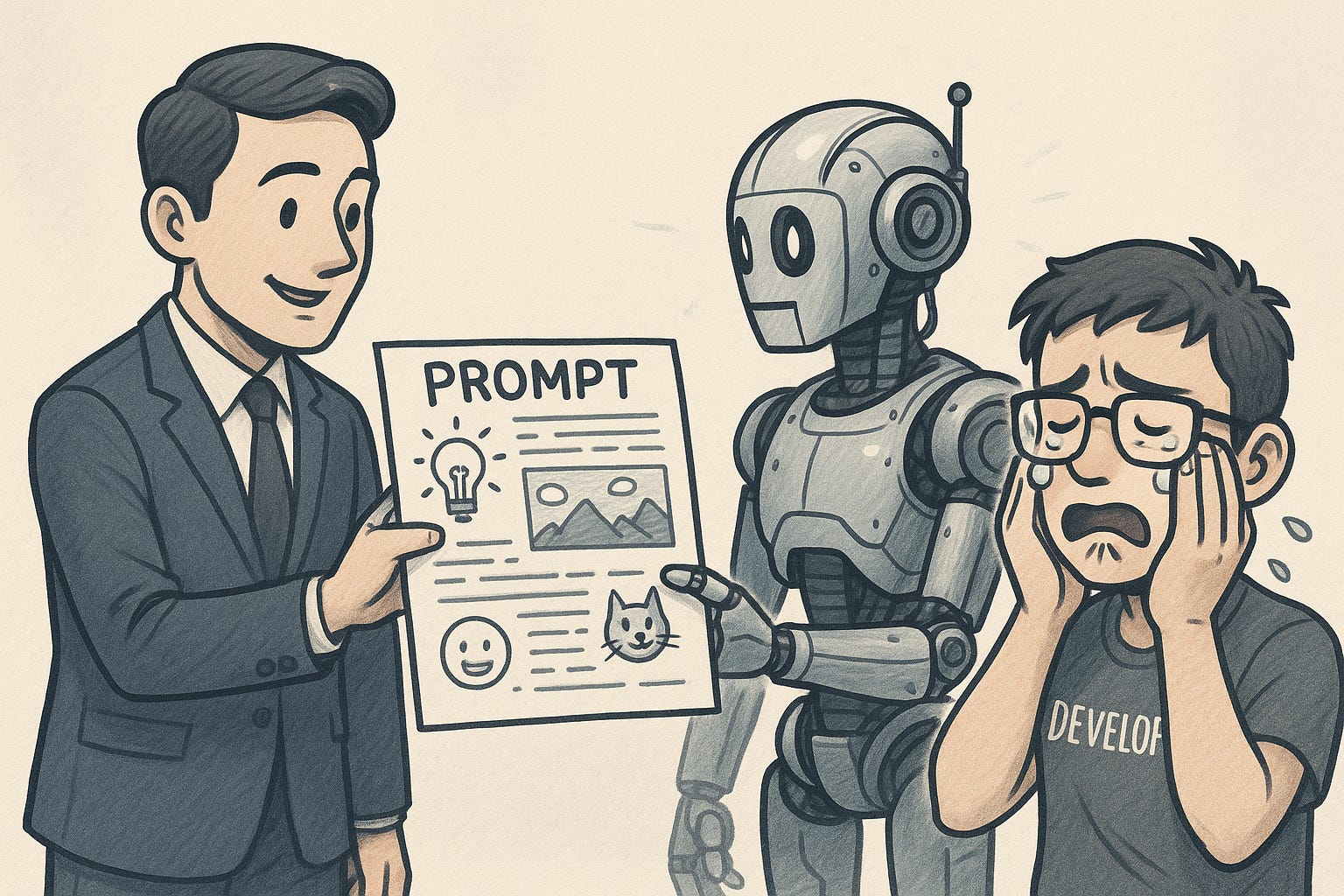
AI’s intrinsic benefit, as I estimated earlier in this article, is less than 10%, considering that it’s mostly replacing the “Typing code” function. Yet I believe its side effect on people’s behavior can multiply an organization’s productivity several times. Imagine how much productivity you could gain as a developer or business analyst just by having the same detailed prompts people are passing to their AI agents after a few iterations.
The fact that having more fluent communication and well-specified requirements boosts productivity has been well known for a long time. Many different frameworks and methodologies have emerged over the last two decades to improve these processes (Agile, Lean, eXtreme Programming, User Story Mapping, Event-Storming, etc.). To highlight one technique, I’d say Behavior-Driven Development can achieve a similar boost in productivity as compared with an AI strategy. However, these techniques commonly fail to deliver their promises in many organizations because there isn’t enough effort to implement them correctly.
Why is it that people neglect other techniques to enhance how software is produced and only begin to act appropriately in response to the AI hype?
There is one main reason:
Fast, almost instant feedback.
If you give a wrong or incomplete prompt to the AI agent, you get an immediate result. That’s not what you wanted, so you learn, adjust your instructions, and try again. It doesn’t matter if the machine is dumb and didn’t understand you, or if it’s too smart and making wrong assumptions. You’ll notice that very quickly.
If you provide a wrong or incomplete task definition to people, you’ll get a similar result, just slower.
It shouldn’t be like that. We should leverage our human traits and the frameworks and techniques we know to ensure a thorough conversation about the requirements, a full understanding of them, and the selection of the best solution for the problem at hand. All of this in a timely fashion, which allows us to learn as we iterate. But that’s not what you see when you’ve worked in software for a few years: people don’t communicate properly, are too busy to respond appropriately, don’t dare to ask and challenge, get distracted by technical buzzwords, and many other issues.
If we delve deeper into this issue, we could raise an uncomfortable topic as one of the possible reasons: the software industry has been behaving like a spoiled child for too many years. Inefficient processes are standard in many organizations, yet they don’t get better because money is thrown into these startups or even corporate companies that promise the next unicorn to their investors or upper-level management. They keep hiring developers when they have money, and their corresponding personnel in the management layers, as if they would produce better software or more valuable features just by throwing more people into the software factory. They could improve productivity by focusing on the right changes, but their growth strategy pushes them to hire more, as this might make them appear more valuable to future investors. When they don’t deliver their promises, they typically try to adjust their growth with layoffs.
Which takes us to the next topic.
Is AI going to replace software engineers?
The introduction of AI and Vibe Coding is leading many business managers to conclude that they can produce the same software with fewer or no engineers. It’s the same pattern as seen before with the rise of ERPs, Offshoring, Enterprise Integration Platforms, Low-code, and other previous promises.
The difference with AI is that all the other solutions don’t bring any benefits as long as people keep providing poor descriptions of what they want their software to accomplish. Neither do they bring faster feedback. They can sometimes make things worse.
However, we’ve seen how AI encourages people to define things more clearly, to iterate in small increments, learning and refining the result as they go. So, I genuinely believe it’s already making a few software engineers redundant because they were already redundant if people had paid more attention to improving the processes. These organizations have consistently been able to produce the same results with fewer engineers, and AI is merely their catalyst, driving change (it also looks better for the public to say they’re laying off people due to AI, rather than admitting they’re struggling to make money because of poor strategic choices or internal processes).
Aside from this natural adjustment to the organization's real needs, software developers will change the way they work to do more prompt engineering and less code engineering (or typing), as we covered in the Vibe Coding strategy.
So, is AI going to replace software development? No, it isn’t for now, it’s going to change how we work and ideally push ourselves more into software design, systems modeling, and architecture. At least until Strategy 3 works fully.
Takeaways
AI’s most disruptive aspect is that it provides almost instant feedback to the prompter, acting as a sparring partner to refine business requirements and code design more effectively.
Well-implemented existing techniques that foster effective communication and better discussions of business requirements could have a positive impact nearly as significant as introducing AI agents. But they’re not as fancy or as fast in providing an outcome as AI coders are.
Humans must still manage Software Architecture functions. Only by understanding how the system components are structured, how they interact with each other, and the major software design decisions that underpin them can we effectively operate these systems in real life, making necessary repairs when needed.
When thinking of integrating AI-powered processes in your organization, look first at your existing ways of working and identify inefficiencies that are better fixed before doing things more complicated.
For organizations running an existing business, it’s better to start with AI-assisted coding and then try Vibe Coding. And play with AI Prototyping for new products or services. I think firing people as a first step without validating that you can have fewer software developers is a bad idea, even when you think it can look good to your investors.
Follow-up articles
This article is long, yet I left some topics behind that I may cover in future editions. Subscribe and do not miss them!
Practical examples on how to pass software architecture principles and instructions to the AI agent to get a consistent, readable outcome. It’s the next step to connect the Mosy framework with AI agents.
Using AI for other functions in the Delivery Map — sales, product management, product design, etc.
Requirements for an organization to effectively integrate AI agents.
Bonus: Predictions and Reflections
When would AI reach what I described as Strategy 3? When will it get to a maturity level where anyone can build an entire (self-healing) product application simply by having a conversation?
Let me start by trying to predict when AIOps (or something named differently) will reach a level where it can fix bugs and remediate security breaches in code created by the same or a different AI agent. This topic is comparable to self-driving cars. Technology will not be the slowest part; it’ll be regulation. Therefore, we’ll see different maturity levels of AIOps self-healing software applied to various types of applications. Is the software managing a hospital? Let’s better have a person dealing with the bug (which implies that the code, or at least components, must be understandable). Is it an app to order food? Let’s have our drink while the AI agent fixes the incident. But wait, can that app leak personal data? Then the (future) regulation says a person must be involved in the remediation.
For software with no risks in terms of downtime, dangerous misbehavior, or sensitive data leakage, I foresee that we can make Strategy 3 a reality within one year. So, soon we’ll have all these new social media posts with pet projects popping up.
Other systems with higher criticality can still benefit significantly from the automation provided by AI agents. However, they will still require a human to lead the process of diving into the code, identifying the root cause, and making (or approving) the necessary changes. For these systems, I don’t think we can hand over complete control to AI within the next 10 years, and I think that would be a sensible period considering the risks posed by having a machine make decisions where most of us don’t know how the machine was trained to react.
About the pet projects and applications you can build in one day. Once Strategy 3 is a reality, all these software applications will quickly become obsolete. The personal AI assistants will cannibalize them, as they can also build these apps themselves, so they’ll do everything that these simple apps can do through their conversational interface. So, do you still feel safe as a product manager? You should, as long as you’re not only building pet projects.
We’ll keep building software anyway, because we can make software way more convoluted and create new needs nobody had before. That’s how we “progress”. See how video games have evolved in the last forty years. From simple algorithms and basic sprites to multi-million dollar VR productions with astonishing graphics. With AI, people will create software to “augment” humans (or “idiotize” them, depending on your take on it) by transferring a lot of what we do now to AI agents, which will interact with other people’s or businesses’ AI agents in their own gibberish language. To save us time so that we can spend it on new social media and entertaining material powered by AI content creation. To prevent us from having to interact with other humans because they’re complicated. Look at how inefficient we are at producing software.
I had a great time playing Bloodshot with my friend on my SEGA Genesis back in 1995. The “augmented” version of me can play new video games, watch an AI-powered TV that asks to accept cookies, or use these new AI agents that prevent me from talking to real people. However, I still enjoy spending time with my family and friends more.
Get out. Talk to people. If you’re afraid of losing your job, try to find one either in companies building critical systems or in startups building fancy AI agents.
Get in touch
I’m an independent consultant helping organizations improve their software development processes.
Don’t hesitate to reach out if you need help with the integration of AI strategies.
But remember, you don’t need AI to improve your productivity significantly. Interested? Ask me how.